Poster design workflow
Generate launch posters and ad creatives with one prompt-driven workflow
Create product launch posters, event graphics, promotional posters, and ad-ready campaign visuals from a prompt. Ask for strong focal hierarchy, copy-safe space, and a composition that can move into final design.
Use this workflow when you need poster maker from text speed, but still want a marketing-ready concept. Describe the audience, headline space, hero subject, mood, format, and channel so GPT Image 2 generates a poster direction you can refine instead of a generic art image.
- Create AI posters for launches, campaigns, events, and paid social
- Prompt for composition, negative space, typography room, and hero subject focus
- Works for promotional poster generator use cases, not just art experiments
- Faster poster iteration than rebuilding every concept in a design editor
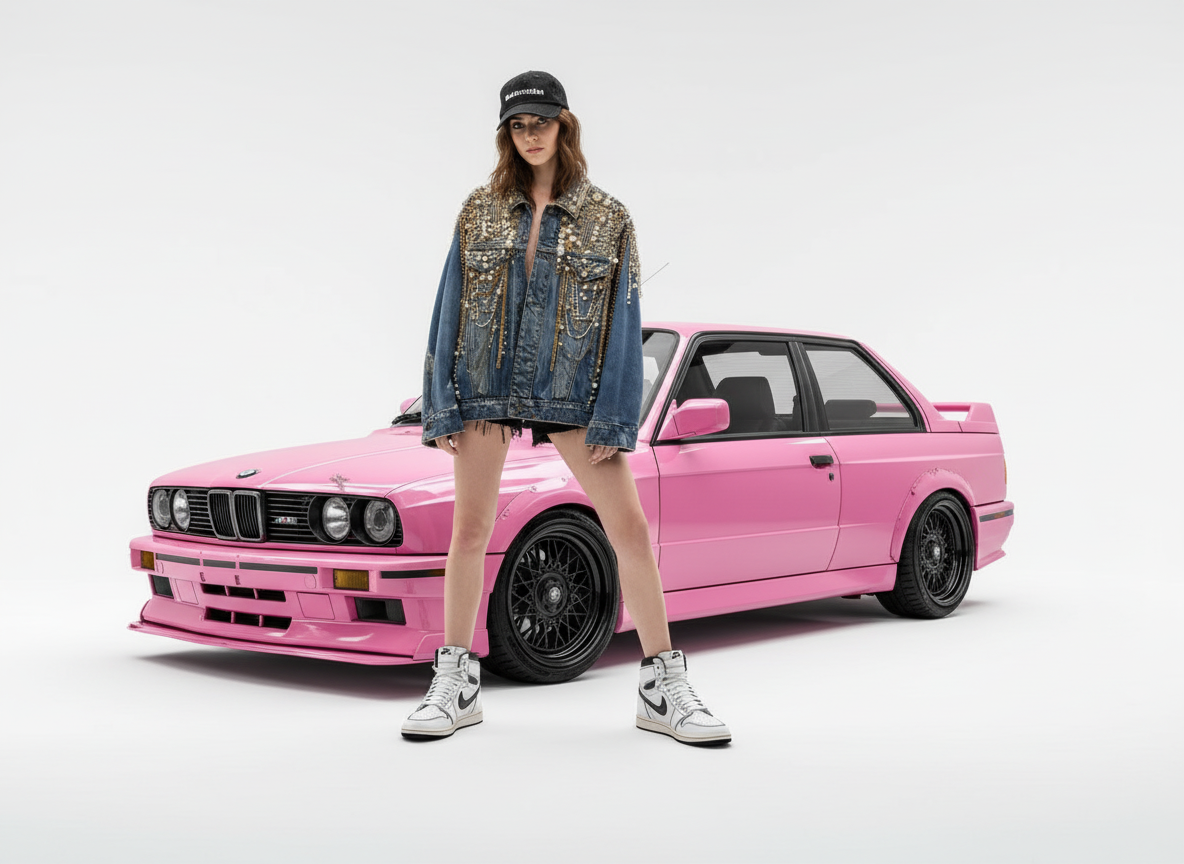
Fashion launch poster direction generated from one brief
Turn a campaign idea into a poster-style key visual with a hero subject, clean studio space, and enough negative space for final launch copy.
Example prompt
Create a premium fashion launch poster with a confident model, a pink performance car as the campaign prop, bright studio background, editorial lighting, bold composition, and clean copy-safe space for the launch headline.
Product launch posters
Generate key art for new product drops, feature launches, and waitlist campaigns when you need a strong first-frame visual fast.
Event promotion graphics
Use it as an AI event poster generator for webinars, openings, music nights, exhibitions, and seasonal campaigns.
Advertising creatives
Create ad-ready poster concepts that can later become paid social images, cover graphics, banners, or print-ready poster drafts.
What makes an AI poster useful for marketing
A good AI poster generator result should communicate a campaign idea clearly, not just create a dramatic image. Review the poster as a layout direction before it becomes final creative.
One clear visual promise
The poster should make the product, event, offer, or announcement obvious within a few seconds.
Readable layout space
There should be controlled negative space for the headline, logo, date, price, CTA, or final copy layer.
Channel-aware composition
A launch poster, social ad, webinar graphic, and printable poster need different crop safety, contrast, and visual density.
AI poster prompt checklist
Give the model a campaign brief instead of a loose art direction.
Define the job of the poster
State whether the poster needs to sell a product, announce an event, promote a sale, attract waitlist signups, or introduce a brand moment.
Control the layout
Ask for a hero subject, focal hierarchy, clean title area, brand-safe color mood, and room for any logo or CTA.
Decide how text is handled
If the exact words matter, keep them short and use the accurate text image workflow. If not, ask for copy-safe space and add text later.
What to review before publishing a poster
Long copy belongs in a design tool
AI-generated posters work best with short visible text or blank layout space. Long event details, disclaimers, and terms should be typeset later.
Brand compliance still matters
Check colors, typography direction, logo treatment, claims, and offer wording against your brand and advertising guidelines.
Print needs production checks
For physical posters, review resolution, bleed, safe margins, color profile, and final typography outside the generation workflow.
How it works
Step 1
Define the poster subject and goal
Tell the model what product, event, or offer should dominate the composition and where the visual will be used.
Step 2
Ask for layout-friendly composition
Specify negative space, readable focal structure, brand mood, and whether the image needs room for poster copy or logo placement.
Step 3
Refine into a publishable marketing poster
Keep iterating contrast, art direction, and visual hierarchy until the creative is strong enough for launch, ad, or event use.
FAQ
What makes a good AI poster generator prompt?
A strong prompt defines the hero subject, the campaign mood, the intended audience, and whether you need negative space for titles, logos, or CTA copy.
Is this better for digital posters or printable posters?
It is strongest as a fast digital-poster workflow for campaigns, launch graphics, and social promotion. You can upscale or refine later if you need cleaner exports for print.
Should I start with an AI poster generator or an image editor?
Start with the generator when you need a fresh poster concept from text. Start with editing when you already have a base image and want to transform it into a more poster-like creative.
Can an AI poster generator create posters with text?
Yes, but keep visible text short and check spelling carefully. For headline-first graphics, use the accurate text workflow or add final typography in a design tool.
How do I avoid generic AI poster results?
Include the audience, campaign goal, product or event context, composition constraints, brand mood, and the exact channel where the poster will be used.