パッケージモックアップワークフロー
資料、ローンチ、ストア表示用のパッケージモックアップをすばやく生成
最終レンダーやスタジオ撮影の前に、パウチ、ボトル、箱、ラベル、商品プレゼン用モックアップを生成できます。素材、カメラ角度、棚での見え方、ラベル階層をプロンプトで検証できます。
ピッチ資料、ローンチ前ページ、商品リスト、クリエイティブレビュー向けに、商品パッケージモックアップの方向性を素早く作りたいときに使うワークフローです。包装形式、素材、ラベル領域、照明、小売での見え方まで明記すると、信頼感のあるモックアップとして伝わりやすくなります。
- Create packaging mockups for box, bottle, pouch, jar, tube, and label concepts
- Useful for product packaging mockup needs before final production artwork exists
- Good fit for ecommerce previews, sales decks, concept boards, and launch pages
- Faster than hand-building every early packaging concept in 3D software
- 箱、ボトル、パウチ、ジャー、チューブ、ラベル案のパッケージモックアップを作成
- 最終の製造用アートワークがない段階の商品パッケージモックアップに便利
- ECプレビュー、営業資料、コンセプトボード、ローンチページに適合
- 初期の包装コンセプトを毎回3Dソフトで手作業するより速く検討
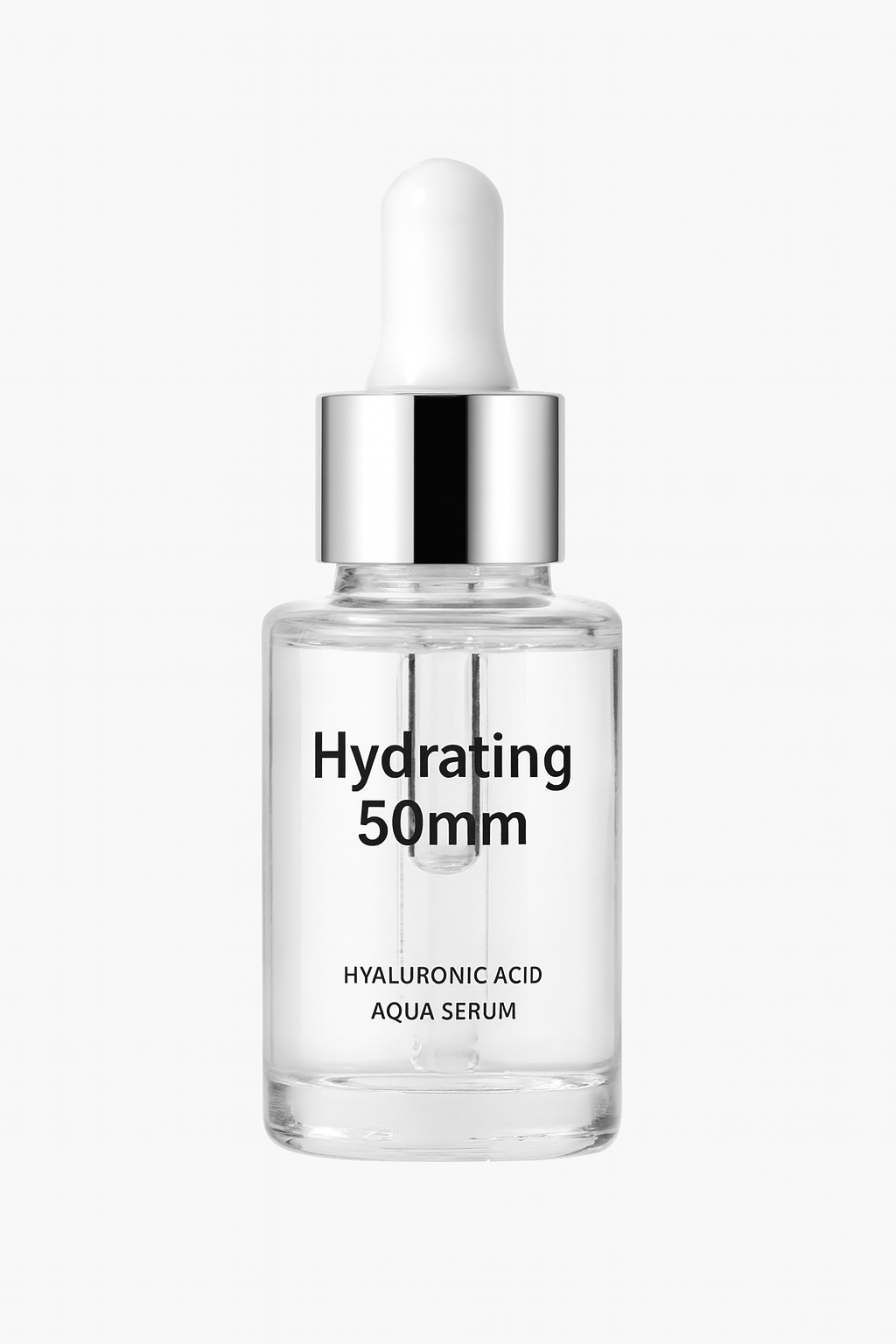
商品レビュー向けのボトルとラベルのモックアップ方向性
清潔なパッケージ形状から始め、最終デザインデータへ進む前に、ラベル階層、素材感、EC向けの商品プレゼンを検討できます。
プロンプト例
明確な正面ラベル、リアルなガラス反射、柔らかなスタジオ照明、見やすいラベル階層、清潔な背景上のEC向け構図を備えた高級スキンケアボトルのパッケージモックアップを作成。
Pre-launch packaging concepts
Visualize product packaging before print files, 3D renders, or production photos are finished.
Sales and investor decks
Add cleaner product packaging mockups to buyer presentations, internal decks, and fundraising materials.
Storefront and preorder visuals
Use packaging-first visuals for collection pages, preorder announcements, and product launch teasers.
ローンチ前のパッケージコンセプト
印刷データ、3Dレンダー、商品撮影が完了する前に、商品パッケージの方向性を可視化できます。
営業資料・投資家向け資料
バイヤー向け提案、社内資料、資金調達資料に、見栄えの良い商品パッケージモックアップを追加できます。
ストア表示・予約販売ビジュアル
コレクションページ、予約販売告知、商品ローンチのティザーに、パッケージを主役にしたビジュアルを使えます。
信頼できるパッケージモックアップの条件
良いパッケージモックアップは、まだコンセプト段階であることを保ちながら、関係者が方向性を具体的に判断できる状態にします。
The package format is specific
The output should clearly read as a pouch, bottle, jar, box, tube, label, or multi-pack instead of a vague product container.
Label hierarchy is believable
The front panel should have a realistic area for brand name, product name, claims, flavor, size, or placeholder copy.
Materials match the category
Glass, matte carton, foil pouch, plastic tube, kraft paper, and luxury box mockups all need different reflections, edges, and surfaces.
包装形式が具体的
出力は曖昧な商品容器ではなく、パウチ、ボトル、ジャー、箱、チューブ、ラベル、複数パックのどれかが明確に伝わる必要があります。
ラベル階層に説得力がある
正面パネルには、ブランド名、商品名、訴求文、フレーバー、容量、仮コピーを置ける現実的な領域が必要です。
素材がカテゴリーに合っている
ガラス、マット紙箱、アルミパウチ、プラスチックチューブ、クラフト紙、高級箱では、それぞれ反射、エッジ、表面の見え方が異なります。
パッケージモックアッププロンプトのチェックリスト
まず物理的な形状を説明し、その後にデザイン方向性とレビュー用途を伝えます。
Name the form factor
Start with the exact package type, camera angle, front-facing or angled view, and whether the mockup should stand alone or appear in a set.
Describe material and scene
Add matte, glossy, glass, paper, metallic, soft pouch, studio lighting, shelf context, countertop, or ecommerce background details.
Separate exact copy from placeholders
Use placeholder label hierarchy for early concepts, or move exact text requirements into the accurate text workflow.
形状を明記する
具体的な包装タイプ、カメラ角度、正面または斜め表示、単体表示かセット表示かから始めます。
素材とシーンを説明する
マット、光沢、ガラス、紙、金属、柔らかいパウチ、スタジオ照明、棚、カウンター、EC背景などの詳細を加えます。
正確な文言と仮コピーを分ける
初期コンセプトでは仮ラベル階層を使い、正確な文字が必要な場合は正確な文字入り画像ワークフローに分けましょう。
モックアップでは代替できないこと
It is not a production dieline
Use AI packaging mockups for direction and review, then create final dielines, barcodes, nutrition panels, and print files in professional tools.
Claims need legal review
Health, sustainability, ingredient, origin, and compliance claims should be reviewed before any mockup becomes customer-facing.
Physical feasibility still matters
Check whether the label size, cap, closure, material, and package shape can actually be manufactured.
製造用の展開図ではありません
AIパッケージモックアップは方向性確認とレビューに使い、最終的な展開図、バーコード、栄養表示、印刷データは専門ツールで作成してください。
訴求文には法務確認が必要
健康、サステナビリティ、成分、原産地、コンプライアンスに関する表現は、顧客向けに公開する前に確認が必要です。
物理的に作れるかも重要
ラベルサイズ、キャップ、開閉部、素材、パッケージ形状が実際に製造可能か確認してください。
使い方
ステップ 1
Describe the packaging type
Start with the form factor: pouch, bottle, box, tube, jar, or another packaging object that needs a mockup.
ステップ 2
Define material, angle, and scene
Add packaging surface details, camera angle, lighting mood, printable label area, and whether the image should feel ecommerce-clean or more editorial.
ステップ 3
Keep the strongest mockup direction
Take the best packaging visual into later editing, upscaling, or design handoff once the concept has stakeholder approval.
ステップ 4
パッケージの種類を説明
パウチ、ボトル、箱、チューブ、ジャーなど、モックアップにしたい包装形状から始めます。
ステップ 5
素材、角度、シーンを定義
包装表面の質感、カメラ角度、照明の雰囲気、印刷可能なラベル領域、EC向けの清潔感かエディトリアル寄りかを指定します。
ステップ 6
最も強いモックアップ方向性を残す
関係者の承認が得られたら、最も良いパッケージビジュアルを後続の編集、アップスケール、デザイン引き継ぎに使います。
FAQ
What is an AI packaging mockup generator best used for?
It is best for fast packaging concepts, sales deck visuals, storefront placeholders, and early product packaging mockups before final production assets exist.
Can I use this for exact production packaging files?
No. It is better as a visual mockup and concept workflow. Use it to speed up direction, then finalize exact dielines and print production inside packaging design tools.
What should I include in a packaging mockup prompt?
Mention the packaging type, front or angled view, material feel, label area, scene, lighting, and whether you need a retail-friendly, ecommerce-ready, or editorial presentation.
Can it generate box, bottle, pouch, and label mockups?
Yes. The workflow is useful for common packaging forms such as boxes, bottles, jars, tubes, pouches, labels, and early multi-pack concepts.
How do I make packaging mockups look less fake?
Specify realistic materials, camera angle, contact shadows, label hierarchy, retail context, and whether the result should feel like studio photography or shelf merchandising.
AIパッケージモックアップ生成は何に最適ですか?
最終的な制作素材がまだない段階で、包装コンセプト、営業資料用ビジュアル、ストア用仮画像、初期の商品パッケージモックアップを素早く作る用途に最適です。
正確な製造用パッケージデータとして使えますか?
いいえ。これはビジュアルモックアップとコンセプト検討のためのワークフローです。方向性決定を速めるために使い、正確な展開図や印刷用データはパッケージデザインツールで仕上げてください。
パッケージモックアップのプロンプトには何を書くべきですか?
包装タイプ、正面または斜め表示、素材感、ラベル領域、シーン、照明、小売向け・EC向け・エディトリアル風のどれにしたいかを書きましょう。
箱、ボトル、パウチ、ラベルのモックアップも生成できますか?
はい。箱、ボトル、ジャー、チューブ、パウチ、ラベル、初期の複数パック案など、一般的な包装形式に使えます。
パッケージモックアップをより自然に見せるには?
リアルな素材、カメラ角度、接地影、ラベル階層、小売での見え方、スタジオ撮影風か棚陳列風かを具体的に指定してください。