AI商品撮影ワークフロー
SKUごとに撮り直さず、EC商品写真をすばやく編集
既存の商品写真をアップロードし、GPT Image 2で背景を整え、照明を改善し、ラベルを鮮明にして、出品、広告、ローンチページ向けに一貫したEC画像を作成できます。
商品は実在しているものの、写真がまだ販売向けではないときに使うワークフローです。元画像から始め、レタッチ内容を説明することで、Shopify、Amazon、Etsy、広告SNS、商品詳細ページ向けに、より清潔なAI商品写真を作成できます。
- Edit existing product photos instead of generating a fake replacement from scratch
- Handle product background remover, lighting correction, and label cleanup in one workflow
- Useful for Shopify, Amazon, Etsy, landing pages, and paid social creatives
- Faster path to consistent AI product photography across a catalog
- ゼロから架空の商品画像を生成するのではなく、既存の商品写真を編集
- 商品背景削除、照明補正、ラベル整理をひとつのワークフローで対応
- Shopify、Amazon、Etsy、ランディングページ、広告SNS素材に便利
- カタログ全体で一貫したAI商品写真をより速く作成
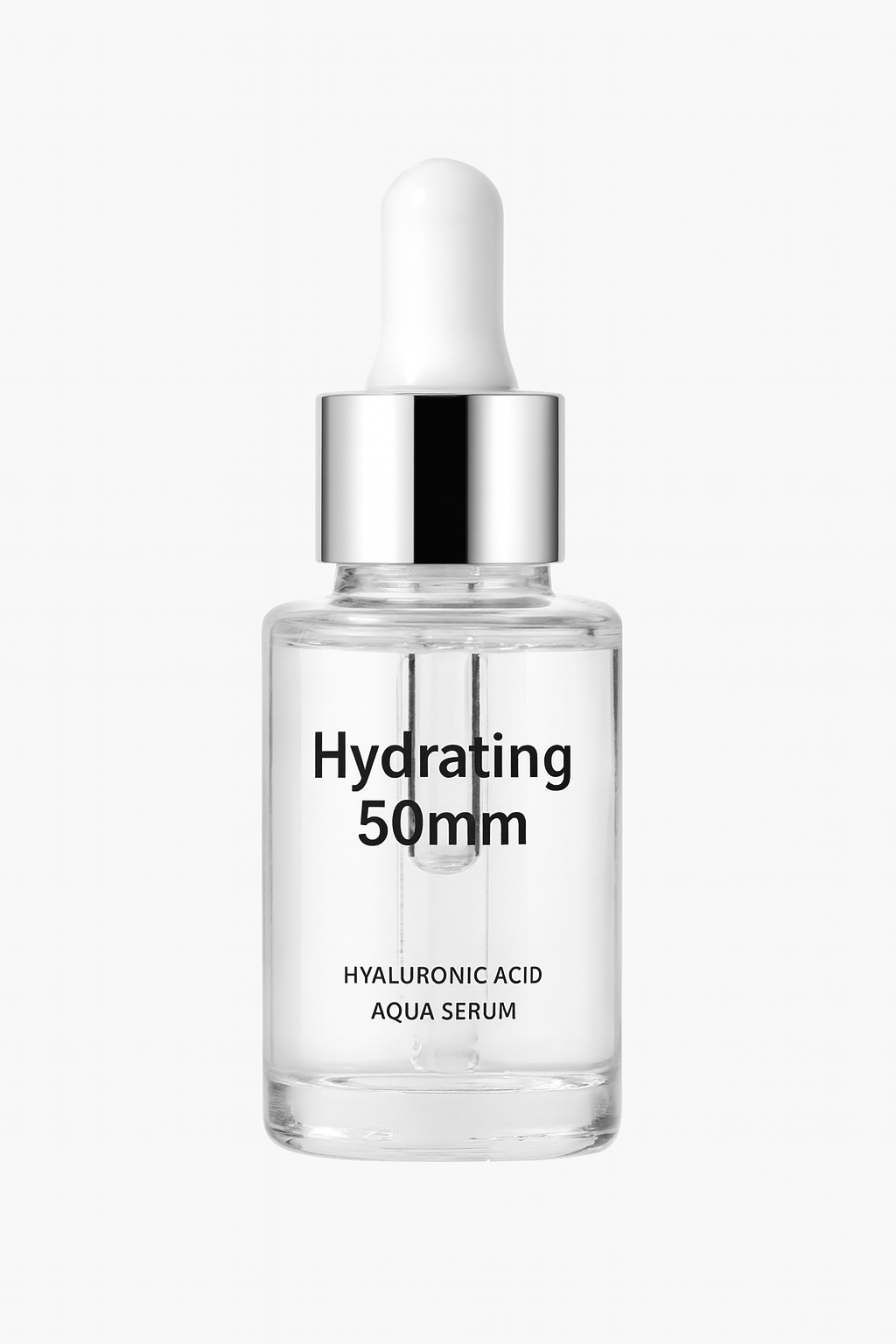
変換前
変換後
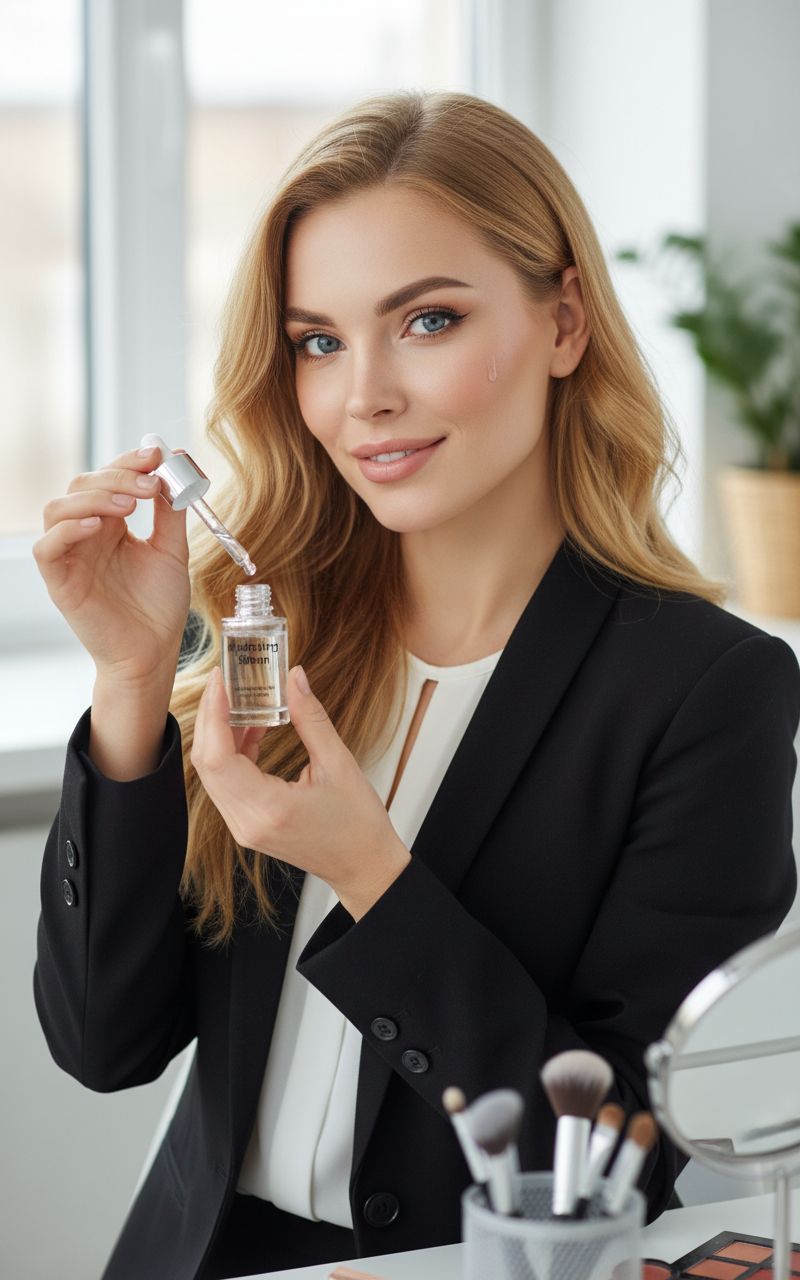
1枚の商品元画像を、清潔なECヒーロー画像へ編集
既存の商品参照を使い、形状とブランド要素を保ちながら周囲のシーンを改善し、よりシャープなECヒーロー画像に仕上げます。
プロンプト例
商品の形状とブランド要素を保ち、雑然とした背景を清潔なウォームベージュのスタジオ背景に差し替え、輪郭の分離を改善し、柔らかくリアルな影を加え、ラベル文字を鮮明にして、高級感のあるECスキンケア商品のヒーロー画像にする。
Ecommerce listing cleanup
Upgrade product thumbnails, PDP hero images, and marketplace listings when the original photo is usable but not polished enough.
Product photo retouching for ads
Create cleaner product cutouts and stronger product image composition before turning them into banners, posters, or paid social assets.
Catalog consistency
Standardize mixed product photography across old and new SKUs so your storefront looks more trustworthy and conversion-ready.
EC出品画像の整理
元写真は使えるものの磨き込みが足りない場合に、商品サムネイル、PDPヒーロー画像、マーケットプレイス出品画像を改善できます。
広告向け商品写真レタッチ
バナー、ポスター、広告SNS素材に展開する前に、より清潔な商品切り抜きと強い商品構図を作成できます。
カタログの一貫性
新旧SKUが混在する商品写真を標準化し、ストア全体をより信頼でき、購入につながりやすい見た目に整えます。
信頼できる商品写真編集に必要なこと
実用的なAI商品写真エディターは、別の商品を作り出すのではなく、商用画像としての品質を高めるべきです。生成した編集画像を公開する前に、以下を確認してください。
Product truth comes first
The edit should preserve the real shape, scale, label hierarchy, logo placement, color family, and material cues from the source photo.
Scene supports the selling job
Choose a studio, shelf, countertop, or lifestyle setup based on where the image will appear: PDP gallery, marketplace listing, launch page, or ad.
Details are reviewed before use
Zoom in on labels, edges, shadows, reflections, and product proportions before using the image in ecommerce or paid campaigns.
商品の正確さを最優先
編集後も、元写真の商品形状、スケール、ラベル階層、ロゴ位置、色味、素材感が保たれている必要があります。
販売目的に合ったシーン
PDPギャラリー、マーケットプレイス出品、ローンチページ、広告など、掲載場所に応じてスタジオ、棚、カウンター、ライフスタイル設定を選びましょう。
使用前にディテールを確認
ECや広告キャンペーンで使う前に、ラベル、輪郭、影、反射、商品の比率を拡大して確認してください。
商品写真編集プロンプトのチェックリスト
まず変更してはいけない部分を守り、そのうえで求める商用改善を説明します。
Lock the product identity
Say which parts must stay unchanged: bottle shape, package color, cap, logo, front label, texture, and product angle.
Specify the edit type
Ask for background cleanup, lighting correction, edge separation, natural shadow, dust removal, label clarity, or a premium studio setup.
Name the channel
Mention whether the final image is for Amazon, Shopify, Etsy, a hero section, a paid social ad, or an internal merchandising review.
商品の同一性を固定する
ボトル形状、パッケージ色、キャップ、ロゴ、正面ラベル、質感、商品角度など、変えてはいけない部分を明記します。
編集タイプを指定する
背景整理、照明補正、輪郭分離、自然な影、ほこり除去、ラベルの鮮明化、高級感のあるスタジオ設定などを指定します。
掲載チャネルを書く
最終画像がAmazon、Shopify、Etsy、ヒーローセクション、広告SNS、社内マーチャンダイジングレビューのどれに使われるかを伝えます。
このワークフローが向かない場合
Exact regulatory text needs review
Do not rely on an AI edit as the final source of truth for nutrition facts, ingredient lists, compliance text, or legal packaging copy.
Damaged source photos limit the result
If the original image is blurry, cropped, overexposed, or missing key product details, reshooting may be faster than forcing an edit.
New concepts need generation first
If you do not have a real product photo yet, start with an image generation or packaging mockup workflow before editing.
規制文言は必ず確認が必要
栄養成分表示、成分表、コンプライアンス文言、法的なパッケージコピーについて、AI編集を最終的な正解として扱わないでください。
元写真の状態が悪いと結果に限界があります
元画像がぼやけている、切れている、白飛びしている、重要な商品ディテールが欠けている場合は、無理に編集するより撮り直したほうが早いことがあります。
新しいコンセプトは先に生成が必要
まだ実際の商品写真がない場合は、編集前に画像生成またはパッケージモックアップのワークフローから始めましょう。
使い方
ステップ 1
Upload the real product photo
Start from the product image you already use for ecommerce or internal merchandising instead of rebuilding the item from zero.
ステップ 2
Describe the product photo edit clearly
Specify background removal, lighting correction, shadow quality, surface cleanup, label clarity, and how premium the final image should feel.
ステップ 3
Export the strongest listing-ready version
Keep the best result for storefront use, then continue into background replacement, upscaling, or additional campaign variations.
ステップ 4
実際の商品写真をアップロード
商品をゼロから作り直すのではなく、ECや社内マーチャンダイジングですでに使っている商品画像から始めます。
ステップ 5
商品写真の編集内容を明確に説明
背景削除、照明補正、影の品質、表面の整理、ラベルの鮮明さ、最終画像に求める高級感を具体的に指定します。
ステップ 6
出品向けに最も強いバージョンを書き出す
ストア掲載に最適な結果を保存し、その後、背景差し替え、アップスケール、追加キャンペーンバリエーションへ進めます。
FAQ
What is an AI product photo editor best for?
It is best for improving an existing product image: cleaner backgrounds, more consistent lighting, sharper details, and faster ecommerce-ready product photography.
Should I use an AI product photo editor or an AI product photo generator?
Use editing when you already have a real product shot and need product photo retouching. Use full generation when you need a brand new concept, packaging scene, or hero composition from scratch.
Can this help with product image consistency across a catalog?
Yes. Editing from real source photos is usually the fastest way to keep the same product shape, branding, and proportions while improving the visual quality across multiple listings.
Can it preserve exact labels and logos?
Starting from a real image helps, but you should still inspect every label, logo, and small detail before publishing. For exact text-heavy designs, use this as an editing pass and keep final review in your design workflow.
How do I write a better product photo edit prompt?
Tell the model what must stay unchanged, what should be improved, the lighting and background you want, and the channel where the image will be used.
AI商品写真エディターは何に最適ですか?
既存の商品画像を改善する用途に最適です。背景をきれいにし、照明をそろえ、ディテールを鮮明にして、EC向け商品写真をすばやく作成できます。
AI商品写真エディターとAI商品写真生成ツールのどちらを使うべきですか?
実際の商品写真があり、商品写真のレタッチが必要な場合は編集を使います。新しいコンセプト、パッケージシーン、ヒーロー構図をゼロから作る場合は生成を使いましょう。
カタログ全体の商品画像の一貫性にも役立ちますか?
はい。実際の元写真から編集する方法は、商品形状、ブランド、比率を保ちながら、複数出品のビジュアル品質を高める最短ルートになりやすいです。
正確なラベルやロゴを保てますか?
実画像から始めると保ちやすくなりますが、公開前にすべてのラベル、ロゴ、小さなディテールを必ず確認してください。正確な文字量が多いデザインでは、編集工程として使い、最終確認はデザインワークフローで行いましょう。
より良い商品写真編集プロンプトを書くには?
変えてはいけない部分、改善したい部分、希望する照明と背景、画像を使うチャネルをモデルに伝えてください。