ポスターデザインワークフロー
プロンプト主導のワークフローでローンチポスターと広告クリエイティブを生成
プロンプトから商品ローンチポスター、イベント画像、販促ポスター、広告向けキャンペーンビジュアルを作成できます。強い視線誘導、コピー用余白、最終デザインへ進めやすい構図を指定できます。
テキストからポスターを素早く作りたい一方で、マーケティングに使えるコンセプトも必要なときに使うワークフローです。対象読者、見出しスペース、主役被写体、雰囲気、形式、チャネルを説明すると、GPT Image 2が汎用的なアート画像ではなく、調整しやすいポスター方向性を生成します。
- Create AI posters for launches, campaigns, events, and paid social
- Prompt for composition, negative space, typography room, and hero subject focus
- Works for promotional poster generator use cases, not just art experiments
- Faster poster iteration than rebuilding every concept in a design editor
- ローンチ、キャンペーン、イベント、広告SNS向けAIポスターを作成
- 構図、余白、タイポグラフィ用スペース、主役被写体の焦点を指定
- アート実験だけでなく、販促ポスター生成の用途にも対応
- デザインエディターで各案を作り直すより速くポスターを反復
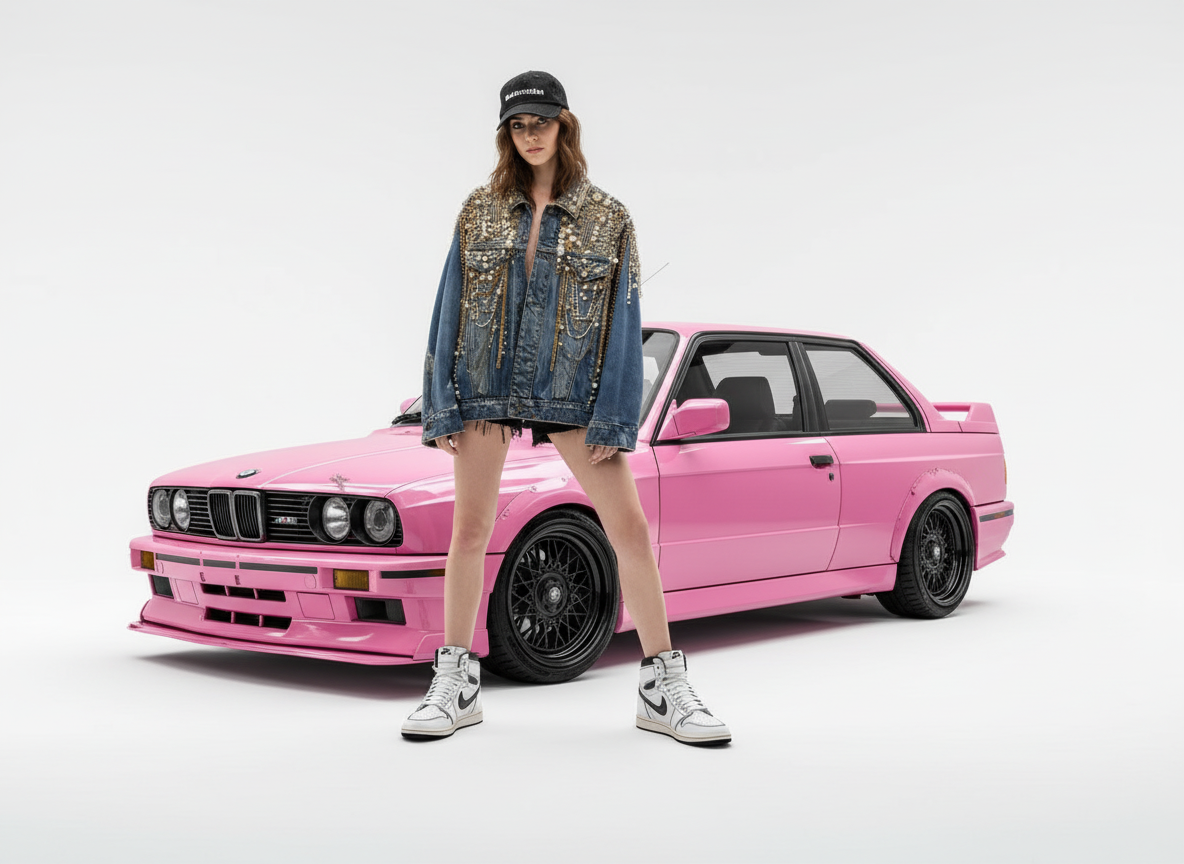
1つのブリーフから生成したファッションローンチポスター案
キャンペーンアイデアを、主役被写体、清潔なスタジオ空間、最終ローンチコピー用の十分な余白を備えたポスター風キービジュアルに変換します。
プロンプト例
自信のあるモデル、キャンペーン小物としてのピンクのスポーツカー、明るいスタジオ背景、エディトリアル照明、大胆な構図、ローンチ見出し用の清潔なコピー余白を備えた高級感のあるファッションローンチポスターを作成。
Product launch posters
Generate key art for new product drops, feature launches, and waitlist campaigns when you need a strong first-frame visual fast.
Event promotion graphics
Use it as an AI event poster generator for webinars, openings, music nights, exhibitions, and seasonal campaigns.
Advertising creatives
Create ad-ready poster concepts that can later become paid social images, cover graphics, banners, or print-ready poster drafts.
商品ローンチポスター
新商品ドロップ、機能ローンチ、ウェイトリスト施策で、強い第一印象のキービジュアルがすぐ必要なときに生成できます。
イベント告知グラフィック
ウェビナー、オープニング、音楽イベント、展示会、季節キャンペーン向けのAIイベントポスター生成として使えます。
広告クリエイティブ
広告SNS画像、カバー画像、バナー、印刷用ポスター草案へ展開できる、広告向けポスターコンセプトを作成できます。
マーケティングに使えるAIポスターの条件
良いAIポスター生成結果は、ただドラマチックな画像を作るだけでなく、キャンペーンアイデアを明確に伝える必要があります。最終クリエイティブにする前に、レイアウト方向性として確認しましょう。
One clear visual promise
The poster should make the product, event, offer, or announcement obvious within a few seconds.
Readable layout space
There should be controlled negative space for the headline, logo, date, price, CTA, or final copy layer.
Channel-aware composition
A launch poster, social ad, webinar graphic, and printable poster need different crop safety, contrast, and visual density.
明確なビジュアルメッセージ
ポスターは、商品、イベント、オファー、告知内容が数秒で伝わる必要があります。
読みやすいレイアウト余白
見出し、ロゴ、日付、価格、CTA、最終コピーを置くための整理された余白が必要です。
チャネルに合った構図
ローンチポスター、SNS広告、ウェビナー画像、印刷用ポスターでは、それぞれ必要なトリミング安全域、コントラスト、情報密度が異なります。
AIポスタープロンプトのチェックリスト
曖昧なアート指示ではなく、キャンペーンブリーフとしてモデルに伝えましょう。
Define the job of the poster
State whether the poster needs to sell a product, announce an event, promote a sale, attract waitlist signups, or introduce a brand moment.
Control the layout
Ask for a hero subject, focal hierarchy, clean title area, brand-safe color mood, and room for any logo or CTA.
Decide how text is handled
If the exact words matter, keep them short and use the accurate text image workflow. If not, ask for copy-safe space and add text later.
ポスターの役割を定義する
商品を売る、イベントを告知する、セールを訴求する、ウェイトリスト登録を集める、ブランドの瞬間を紹介するなど、目的を明記します。
レイアウトをコントロールする
主役被写体、視線の階層、清潔なタイトル領域、ブランドに合った色の雰囲気、ロゴやCTA用の余白を指定します。
文字の扱い方を決める
正確な文言が重要な場合は短くし、正確な文字入り画像ワークフローを使いましょう。そうでない場合はコピー用余白を指定し、文字は後から追加します。
ポスター公開前に確認すべきこと
Long copy belongs in a design tool
AI-generated posters work best with short visible text or blank layout space. Long event details, disclaimers, and terms should be typeset later.
Brand compliance still matters
Check colors, typography direction, logo treatment, claims, and offer wording against your brand and advertising guidelines.
Print needs production checks
For physical posters, review resolution, bleed, safe margins, color profile, and final typography outside the generation workflow.
長いコピーはデザインツールで入れる
AI生成ポスターは、短い表示テキストまたは空白レイアウトスペースに向いています。長いイベント詳細、免責事項、利用条件は後から組版しましょう。
ブランド準拠は引き続き重要
色、タイポグラフィの方向性、ロゴの扱い、訴求内容、オファー文言がブランド・広告ガイドラインに沿っているか確認してください。
印刷には制作チェックが必要
物理ポスターの場合は、生成ワークフローの外で解像度、塗り足し、安全マージン、カラープロファイル、最終タイポグラフィを確認してください。
使い方
ステップ 1
Define the poster subject and goal
Tell the model what product, event, or offer should dominate the composition and where the visual will be used.
ステップ 2
Ask for layout-friendly composition
Specify negative space, readable focal structure, brand mood, and whether the image needs room for poster copy or logo placement.
ステップ 3
Refine into a publishable marketing poster
Keep iterating contrast, art direction, and visual hierarchy until the creative is strong enough for launch, ad, or event use.
ステップ 4
ポスターの主題と目的を定義
どの商品、イベント、オファーを構図の中心にするか、どこで使うビジュアルかをモデルに伝えます。
ステップ 5
レイアウトしやすい構図を指定
余白、読みやすい焦点構造、ブランドの雰囲気、ポスターコピーやロゴ配置用のスペースが必要かを指定します。
ステップ 6
公開できるマーケティングポスターへ磨き込む
ローンチ、広告、イベントで使える強さになるまで、コントラスト、アートディレクション、視覚階層を調整します。
FAQ
What makes a good AI poster generator prompt?
A strong prompt defines the hero subject, the campaign mood, the intended audience, and whether you need negative space for titles, logos, or CTA copy.
Is this better for digital posters or printable posters?
It is strongest as a fast digital-poster workflow for campaigns, launch graphics, and social promotion. You can upscale or refine later if you need cleaner exports for print.
Should I start with an AI poster generator or an image editor?
Start with the generator when you need a fresh poster concept from text. Start with editing when you already have a base image and want to transform it into a more poster-like creative.
Can an AI poster generator create posters with text?
Yes, but keep visible text short and check spelling carefully. For headline-first graphics, use the accurate text workflow or add final typography in a design tool.
How do I avoid generic AI poster results?
Include the audience, campaign goal, product or event context, composition constraints, brand mood, and the exact channel where the poster will be used.
良いAIポスター生成プロンプトとは?
良いプロンプトは、主役被写体、キャンペーンの雰囲気、想定読者、タイトル・ロゴ・CTAコピー用の余白が必要かどうかを明確にします。
デジタルポスターと印刷用ポスターのどちらに向いていますか?
キャンペーン、ローンチ画像、SNSプロモーション向けの高速なデジタルポスターワークフローとして特に強みがあります。印刷向けによりきれいな書き出しが必要な場合は、後からアップスケールや調整ができます。
AIポスター生成と画像エディター、どちらから始めるべきですか?
テキストから新しいポスターコンセプトが必要な場合は生成から始めます。すでにベース画像があり、よりポスターらしいクリエイティブに変えたい場合は編集から始めましょう。
AIポスター生成で文字入りポスターを作れますか?
はい。ただし表示テキストは短くし、スペルを必ず確認してください。見出しが重要な画像では、正確な文字入り画像ワークフローを使うか、最終タイポグラフィをデザインツールで追加しましょう。
ありきたりなAIポスター結果を避けるには?
想定読者、キャンペーン目的、商品またはイベントの背景、構図上の制約、ブランドの雰囲気、実際に使うチャネルまで含めて指定してください。