海报设计工作流
用一条提示词更快生成上新海报和广告主视觉
用提示词生成产品上新海报、活动海报、促销海报和可投放的广告视觉。你可以明确主视觉层级、文案留白和后续可设计的构图。
当你需要 poster maker from text 的速度,但仍希望产出更像营销素材时,写清受众、标题区域、hero 主体、氛围、尺寸和投放渠道,GPT Image 2 会更容易生成可继续精修的海报方向。
- Create AI posters for launches, campaigns, events, and paid social
- Prompt for composition, negative space, typography room, and hero subject focus
- Works for promotional poster generator use cases, not just art experiments
- Faster poster iteration than rebuilding every concept in a design editor
- 适合产品上新、活动宣传、投放图和社媒 campaign visuals
- 可以在提示词里明确主体、版式留白、层级和海报情绪
- 不仅是做图,更适合 promotional poster generator 类真实营销场景
- 比每次从零在设计器里搭一版海报更快试方向
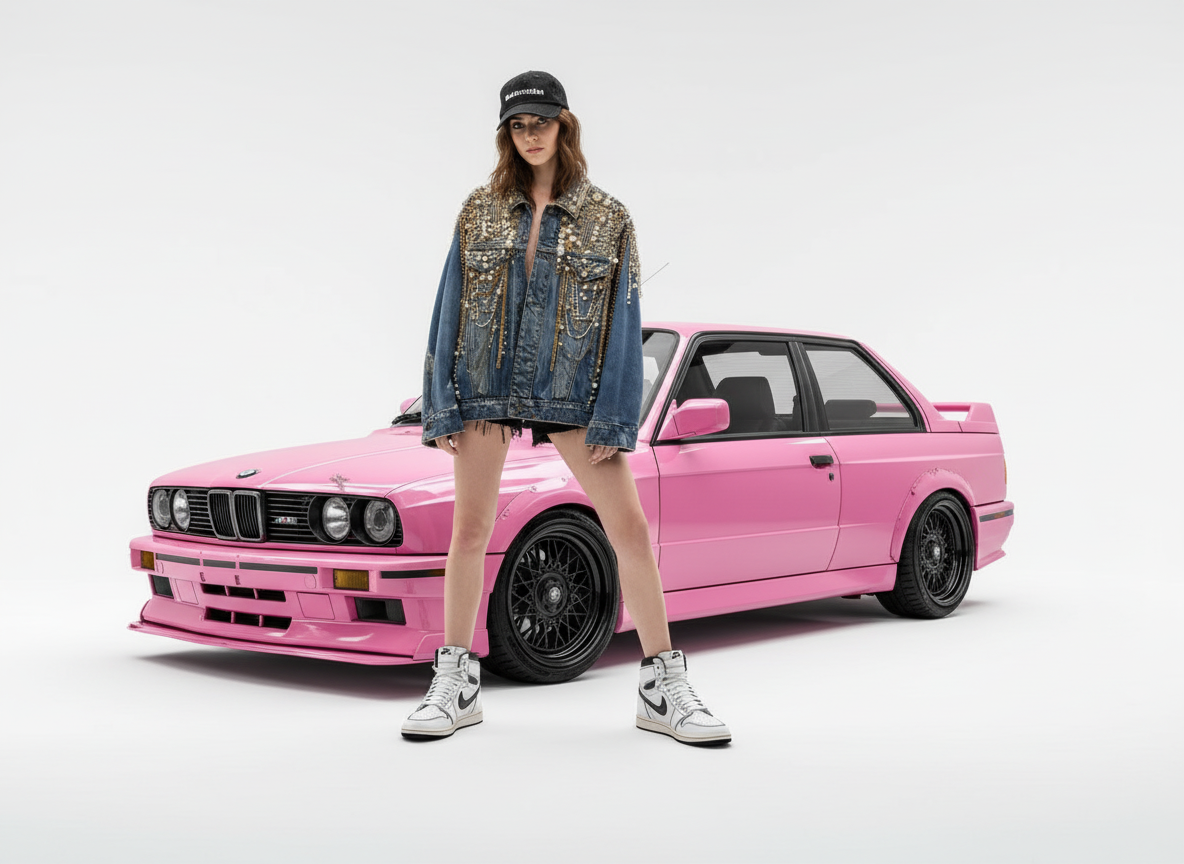
从一条 brief 生成时尚上新海报方向
把 campaign 想法变成带有 hero 主体、干净棚拍空间和标题留白的海报式主视觉。
示例提示词
Create a premium fashion launch poster with a confident model, a pink performance car as the campaign prop, bright studio background, editorial lighting, bold composition, and clean copy-safe space for the launch headline.
Product launch posters
Generate key art for new product drops, feature launches, and waitlist campaigns when you need a strong first-frame visual fast.
Event promotion graphics
Use it as an AI event poster generator for webinars, openings, music nights, exhibitions, and seasonal campaigns.
Advertising creatives
Create ad-ready poster concepts that can later become paid social images, cover graphics, banners, or print-ready poster drafts.
产品上新海报
为新品发布、功能上线、预热页和 waitlist 更快做出一张有冲击力的海报主视觉。
活动宣传图
可作为 AI event poster generator 使用,适合线上活动、展览、演出、促销和节日营销。
广告创意首图
先生成一张海报感更强的广告创意,再扩展成多尺寸 banner、封面图和投放素材。
什么样的 AI 海报更适合营销使用
好的 AI 海报生成结果,不只是好看,而是能清楚传达 campaign 目的。把它当作进入最终设计前的版式方向来检查。
One clear visual promise
The poster should make the product, event, offer, or announcement obvious within a few seconds.
Readable layout space
There should be controlled negative space for the headline, logo, date, price, CTA, or final copy layer.
Channel-aware composition
A launch poster, social ad, webinar graphic, and printable poster need different crop safety, contrast, and visual density.
一个清楚的视觉承诺
用户应在几秒内看懂这是产品、活动、优惠、发布还是品牌事件。
有可读的版式空间
画面要有可控留白,方便放标题、logo、日期、价格、CTA 或最终文案层。
构图适配渠道
上新海报、社媒广告、线上活动图和打印海报,对裁切安全、对比度和信息密度的要求都不同。
AI 海报提示词检查清单
把提示词写成 campaign brief,而不是只写一个模糊的视觉风格。
Define the job of the poster
State whether the poster needs to sell a product, announce an event, promote a sale, attract waitlist signups, or introduce a brand moment.
Control the layout
Ask for a hero subject, focal hierarchy, clean title area, brand-safe color mood, and room for any logo or CTA.
Decide how text is handled
If the exact words matter, keep them short and use the accurate text image workflow. If not, ask for copy-safe space and add text later.
定义海报任务
说明海报要卖产品、发布活动、促销、获取 waitlist 还是介绍一个品牌时刻。
控制版式结构
要求 hero 主体、视觉层级、干净标题区域、品牌安全色调,以及 logo 或 CTA 的放置空间。
决定文字处理方式
如果文字必须准确,保持短句并使用精准文字出图工作流;如果不需要,先生成留白,再后期排版。
海报发布前要额外检查什么
Long copy belongs in a design tool
AI-generated posters work best with short visible text or blank layout space. Long event details, disclaimers, and terms should be typeset later.
Brand compliance still matters
Check colors, typography direction, logo treatment, claims, and offer wording against your brand and advertising guidelines.
Print needs production checks
For physical posters, review resolution, bleed, safe margins, color profile, and final typography outside the generation workflow.
长文案应后期排版
AI 海报更适合短文字或留白构图,活动详情、免责声明和条款建议在设计工具里后加。
品牌合规仍要确认
颜色、字体方向、logo 使用、卖点表述和优惠文案,都需要符合品牌和广告规范。
打印还需要生产检查
如果要做实体海报,还要检查分辨率、出血、安全边距、色彩配置和最终字体。
使用方式
步骤 1
Define the poster subject and goal
Tell the model what product, event, or offer should dominate the composition and where the visual will be used.
步骤 2
Ask for layout-friendly composition
Specify negative space, readable focal structure, brand mood, and whether the image needs room for poster copy or logo placement.
步骤 3
Refine into a publishable marketing poster
Keep iterating contrast, art direction, and visual hierarchy until the creative is strong enough for launch, ad, or event use.
步骤 4
先定义海报主体与目标
先说清楚画面最重要的产品、活动、卖点和使用场景。
步骤 5
要求版式友好的构图
如果后续要加标题、logo 或 CTA,就在提示词里明确需要留白、层级和视觉焦点。
步骤 6
迭代到可发布海报
继续调对比、光线、主体强调和广告感,直到画面足够接近可以上线的营销海报。
常见问题
What makes a good AI poster generator prompt?
A strong prompt defines the hero subject, the campaign mood, the intended audience, and whether you need negative space for titles, logos, or CTA copy.
Is this better for digital posters or printable posters?
It is strongest as a fast digital-poster workflow for campaigns, launch graphics, and social promotion. You can upscale or refine later if you need cleaner exports for print.
Should I start with an AI poster generator or an image editor?
Start with the generator when you need a fresh poster concept from text. Start with editing when you already have a base image and want to transform it into a more poster-like creative.
Can an AI poster generator create posters with text?
Yes, but keep visible text short and check spelling carefully. For headline-first graphics, use the accurate text workflow or add final typography in a design tool.
How do I avoid generic AI poster results?
Include the audience, campaign goal, product or event context, composition constraints, brand mood, and the exact channel where the poster will be used.
什么样的 AI 海报生成提示词更好用?
好的提示词会写清 hero 主体、活动目的、海报情绪,以及是否需要给标题和 logo 预留空间。
它更适合数字海报还是打印海报?
它更适合先做数字海报工作流,比如上线图、广告图、活动图和社媒封面;需要打印时再进一步放大和精修。
应该先用 AI 海报生成器还是图片编辑器?
从零做海报概念时先用生成器;如果已经有图,只是想改成更像海报的版本,再优先用编辑器。
AI 海报生成器可以生成带文字的海报吗?
可以,但建议让文字保持简短,并仔细检查拼写。如果是标题优先的图,建议使用精准文字工作流,或在设计工具里补最终排版。
怎样避免 AI 海报看起来很模板化?
提示词里写清受众、campaign 目标、产品或活动语境、构图限制、品牌氛围,以及最终使用渠道。