产品背景替换工作流
不改动真实产品本身,也能把商品图背景换得更适合售卖
上传商品图,只替换周围场景:棚拍背景、货架场景、台面、季节主题或生活方式环境,同时保留产品形态、品牌元素、光线逻辑和真实接触阴影。
当原始商品图值得保留,但背景不够好时,用这个工作流描述新场景、台面、光线方向、阴影和品牌氛围,把同一张产品图扩展成更干净的电商、平台和广告版本。
- Keep the product intact while changing only the environment around it
- Useful for product photo background changer and AI background replacer workflows
- Prompt for studio, shelf, bathroom, countertop, or branded lifestyle scenes
- Faster than manually rebuilding every product background for each channel
- 保留真实产品本体,只改周围环境和背景
- 适合 product photo background changer 和 AI background replacer 场景
- 可描述 studio、shelf、bathroom、countertop 和品牌化生活方式场景
- 比为每个渠道手工重做商品背景更快
处理前

处理后
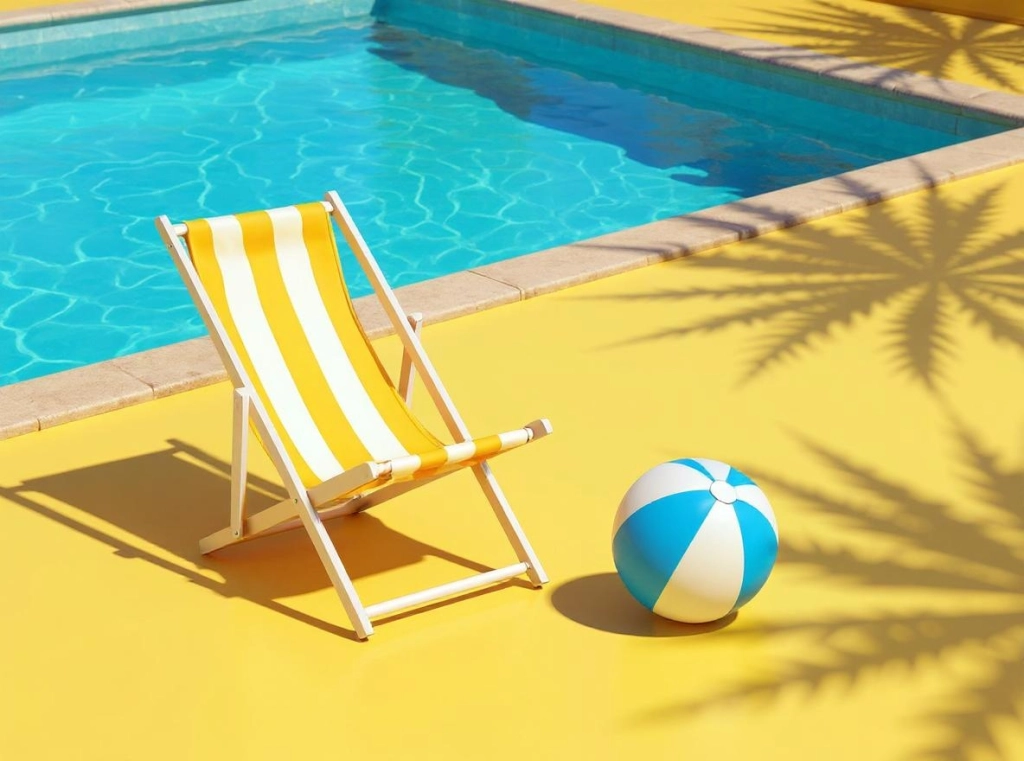
同一产品,更干净的背景,更强的售卖语境
保留同一个物体,只把单调背景替换成更有商业用途的场景,同时保留接触阴影和可信光线。
示例提示词
Keep the chair and beach ball unchanged, replace the flat yellow studio with a bright poolside lifestyle background, preserve realistic contact shadows, match the sunny light direction, and make the final image feel like a polished product scene.
Storefront cleanup
Turn flat product images into cleaner storefront visuals for collection cards, PDP galleries, and category pages.
Seasonal or branded scene swaps
Move the same product into holiday, luxury, minimal, or campaign-specific settings without paying for new photography.
Catalog consistency
Standardize product photo backgrounds across multiple SKUs so your store looks more professional and conversion-ready.
店铺商品图清理
把普通商品图更快处理成适合集合页、详情页和类目页展示的干净版本。
季节性与品牌化场景替换
同一个商品不重拍,也能快速切到节日场景、高级场景、极简场景或 campaign 风格背景。
目录视觉统一
统一多个 SKU 的商品背景,让整店陈列和品牌信任感更稳定。
什么样的产品背景替换更自然
好的产品背景替换应该保持产品真实,同时让周围场景更适合销售和展示。
The product does not drift
Shape, color, texture, logo, label, and proportions should stay consistent with the source product photo.
Lighting and shadow match
The new scene should respect the original light direction, contact shadow, reflection, and surface height.
The background matches the channel
A white marketplace image, luxury studio shot, seasonal scene, and lifestyle ad all need different background rules.
产品本体不能漂移
形状、颜色、纹理、logo、标签和比例应与原始商品图保持一致。
光线和阴影要匹配
新场景应尊重原图光线方向、接触阴影、反光和台面高度,避免产品像悬浮在背景上。
背景要匹配渠道
白底平台图、高级棚拍、节日场景和生活方式广告,对背景规则的要求不同。
产品背景替换提示词检查清单
先保护产品本体,再描述它周围的新环境。
Say what must stay unchanged
Tell the model to keep the product, label, edges, scale, color, and camera angle unchanged.
Describe the new environment
Specify studio white, marble countertop, bathroom shelf, outdoor pool, holiday scene, retail shelf, or branded color backdrop.
Call out shadow behavior
Ask for realistic contact shadows, matching light direction, no floating object, and natural edge blending.
说明哪些不能变
要求保持产品、标签、边缘、比例、颜色和拍摄角度不变。
描述新环境
可以写 studio white、marble countertop、bathroom shelf、outdoor pool、holiday scene、retail shelf 或品牌色背景。
强调阴影规则
要求真实接触阴影、匹配光线方向、不要悬浮、边缘自然融合。
使用前还要检查什么
Marketplace rules may be strict
Amazon, Etsy, and other marketplaces can have specific image policies. Review the final background against the channel requirements.
Reflective products need extra review
Glass, chrome, transparent plastic, and glossy packaging can reveal mismatched reflections after a background swap.
Product edits need a broader workflow
If the product itself also needs label cleanup, lighting correction, or retouching, use the AI product photo editor workflow.
平台图片规则可能很严格
Amazon、Etsy 等平台可能有具体商品图要求,最终背景需要按渠道规则再检查一遍。
反光产品更容易露出问题
玻璃、金属、透明塑料和高亮包装,在换背景后更容易出现反光不匹配。
产品本体编辑要用更完整流程
如果产品本身还需要修标签、补光或精修,优先使用 AI 商品图编辑器工作流。
使用方式
步骤 1
Upload the real product image
Start from the actual product photo you want to preserve so the final output keeps the original item, branding, and proportions.
步骤 2
Describe the new background carefully
Explain the target scene, lighting mood, surface type, and whether you want natural shadow continuity or a cleaner studio backdrop.
步骤 3
Keep the most believable replacement
Choose the version where the product stays consistent and the new background feels realistic enough for ecommerce, ad, or launch use.
步骤 4
上传真实商品图
从你想保留的真实商品照开始,这样更容易保住产品外形、品牌元素和比例。
步骤 5
细化目标背景描述
把新背景、光线、台面材质、阴影风格和整体售卖氛围写清楚。
步骤 6
保留最自然的一版
选择产品保持稳定、背景替换最自然、最适合电商或广告使用的结果。
常见问题
What is background replacement for products best used for?
It is best when the product photo is already good enough and only the setting needs to improve: cleaner studio scenes, branded backdrops, seasonal visuals, or marketplace-friendly merchandising.
Will the product stay the same after background replacement?
That is the goal. Starting from a real source image usually gives you the best chance of preserving the product while only changing the environment and surrounding context.
Should I use background replacement or a full product image generator?
Use background replacement if you already have a product photo worth keeping. Use a full generator when you need a completely new object presentation or an entirely new concept scene.
Can I make white background marketplace product images?
Yes, you can prompt for a clean white or light studio background, but you should still review the final image against each marketplace's image rules.
What details should I check after replacing the background?
Check product edges, shadows, reflections, label accuracy, color consistency, and whether the object looks grounded in the new scene.
产品背景替换最适合做什么?
最适合在商品图本身已经可用时,只升级布景:换成更干净的棚拍场景、品牌背景、节日背景或平台友好的陈列背景。
替换背景后,产品本身会不会变?
目标就是尽量不变。以真实商品图为起点,通常更容易保住产品本体,只调整环境和周边语境。
我该用背景替换还是直接重新生成商品图?
如果你已经有值得保留的商品图,优先用背景替换;如果你需要完全新的产品展示方案或全新概念图,再考虑从零生成。
可以做平台白底商品图吗?
可以,你可以提示生成干净白底或浅色棚拍背景,但仍要按具体平台的商品图规则检查最终结果。
背景替换后重点检查哪些细节?
重点检查产品边缘、阴影、反光、标签准确性、颜色一致性,以及产品是否自然落在新场景里。